Found on Google. Lost on the phone.
A business can rank near the top of Google Maps and still get few calls. Most people who find it tap through on a phone, and what happens on that small screen decides whether they call. This paper explains what goes wrong there, how the Phone Visitor Check in AI Search Scope finds it, and how to read the results.
Ranking is only half the job.
Google Maps, reviews and AI search decide whether people find a business. The website decides whether they get in touch. When the phone view is hard to use, visitors go back to the results and pick the next name. The owner sees fewer calls and assumes people stopped finding them, when the real loss happens after the click.
Nothing in a ranking report shows this. A site can score well for search and AI and still turn phone visitors away.
Top 3 on Google Maps, and a form that sent nothing.
A well-reviewed local practice ranked in the top 3 on Google Maps across most of its area, yet the owner said business had dried up. We opened the home page the way a phone shows it and found:
- The first screen was a logo and a video. No headline said what the business did or where, and there was no button to book.
- The contact form was about 15 phone screens down, near the end of a very long page.
- The form could not send. A script crashed as the page loaded, so pressing Send just reloaded the page. Every message was lost, and the visitor had no way to know.
- One phone link had a stray character, so some phones would not dial it.
- The main content took over 4 seconds to appear on a phone.
The same week, the same check found the identical broken form on one of our own websites. It looked normal. It had been sending nothing. It was fixed the same night, which is why this check now runs on every scan.
A real browser, sized like a phone.
The Phone Visitor Check runs automatically as part of every AI Search Scope report.
Opens the home page on a phone screen
A real Chrome browser loads the page at 375 by 812 pixels, the size of a common phone, with a phone's settings.
Lets the page settle
It moves and scrolls the way a visitor would, so scripts that wait for a visitor get to run. It never taps, clicks or follows a link.
Reads what a visitor sees
It captures the first screen and records the headline, buttons, phone links, forms and how long the page is.
Checks each form can send
It looks for the form's working send function and for script errors that break it. It never types into a form or sends one.
Scores it and lists fixes
Each check passes, could be better, or is a problem. The report shows a phone score from 0 to 100 and what to fix first.
Keeps your AI score separate
The phone score is for your information. It does not change the AI visibility score in the same report.
The 11 checks.
Each one answers a simple question a phone visitor has in the first few seconds: am I in the right place, and how do I reach them?
| Check | Why it matters | Passes when |
|---|---|---|
| First screen says what you do and where | Visitors decide in seconds whether they found the right business. | A clear headline on the first screen names the service and the town. |
| First screen is more than a logo and a picture | A full-screen video or photo pushes everything useful out of sight. | The first screen has words, not only a logo and a picture. |
| Tap-to-call button on the first screen | Many people who find a local business on Maps want to call. | A phone link is visible on the first screen, or stays on screen while scrolling. |
| Booking or contact button on the first screen | Some people would rather book or write than call. | A Book, Contact or Free Consultation button shows on the first screen. |
| Contact form is easy to reach | Long phone pages bury forms where few people scroll. | The first form starts within about 2.5 phone screens. |
| Home page form can actually send | A broken form looks normal, so messages vanish without anyone knowing. | The form has a working send function and no script error stops it. |
| Phone links are set up correctly | One wrong character can stop some phones from dialing. | Every phone link holds only the number. |
| Short read before the first button | Long text before any button loses people. | About 120 words or fewer come before the first call, contact or booking button. |
| Footer is not overloaded | Walls of links and tag clouds make a site look cluttered. | No tag cloud, and a short list of footer links. |
| One page builder, not two | Two builders mean more code to load and more ways for scripts to clash. | The page loads one builder. |
| Main content shows up fast | A slow first screen sends people back to the results. | The main content appears in under 2.5 seconds, using Google's own phone speed test. |
Why a form can look fine and send nothing.
Many WordPress sites build their forms with a page builder and use a speed plugin to make pages load faster. Speed plugins delay some scripts so the page appears sooner. When they delay part of the page builder but not the part that runs the form, the form's script starts too early, crashes, and never connects the Send button.
The visitor sees a normal form. They fill it in, press Send, and the page reloads. There is no error, no thank-you message and no email. The owner never hears about it, because as far as the website is concerned, nothing was sent.
What the check looks for
- Script errors that the page throws while it loads
- Whether the form has its send function once the page settles
- Forms that rely on a script that never started
What usually fixes it
- One setting in the speed plugin, so it stops delaying the page builder's scripts
- Clear the site's cache
- Send a real test message from a phone and confirm it arrives
The phone score.
The score adds up the checks, with the ones that cost the most calls weighted most: a form that can send, a tap-to-call button and a clear first screen.
A phone visitor can see what you do and reach you quickly.
Most visitors can reach you, but a few things slow them down.
Visitors who found you may give up and choose another business.
Visitors who found you on Google are likely choosing a competitor.
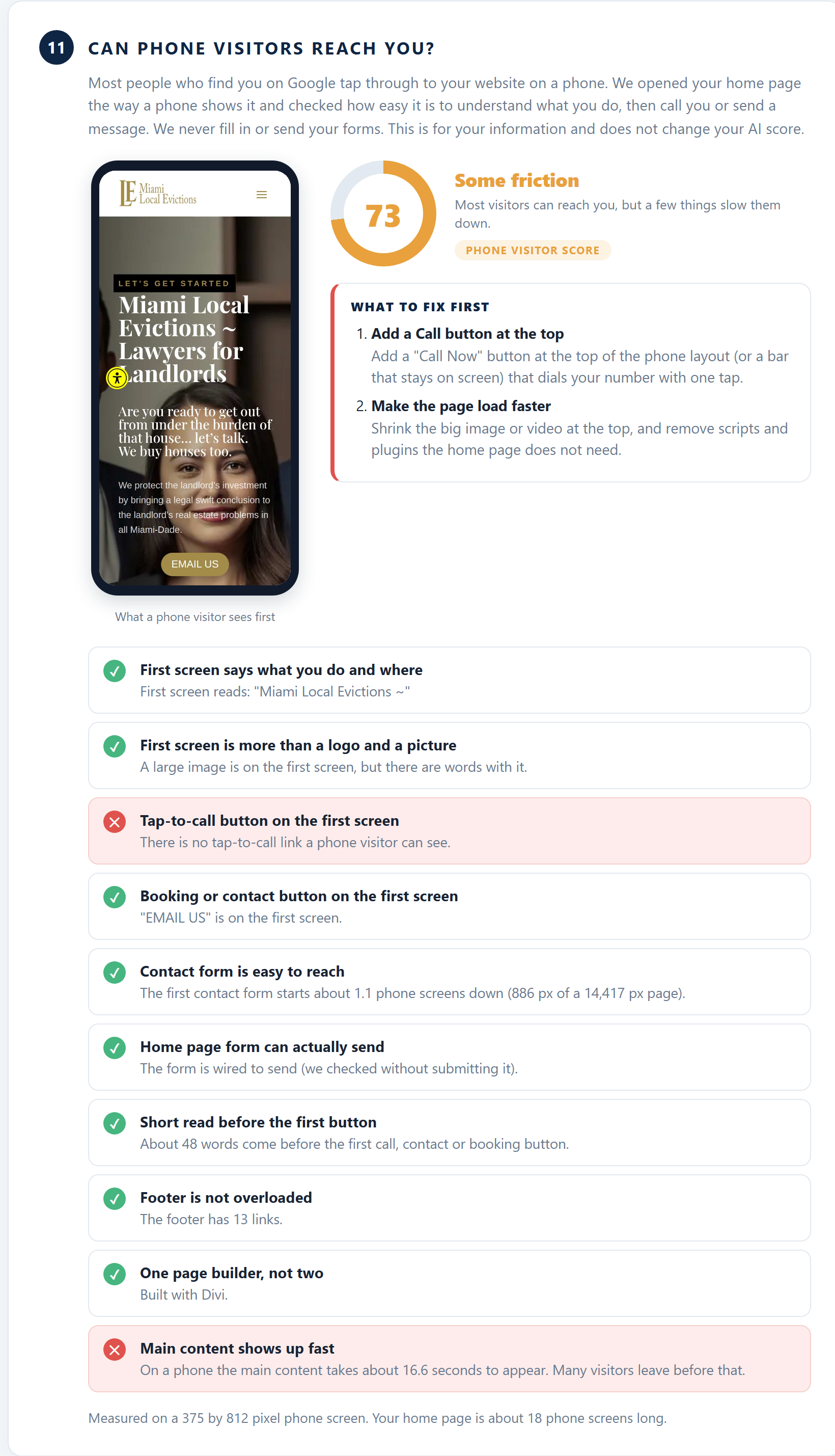
A real result from one of our own sample sites: a clear first screen and a working form, but no tap-to-call button, and the main content takes about 16.6 seconds to appear on a phone.
See why people call the other business.
When two businesses show up side by side on Google, visitors often pick the site that makes calling or booking easier. A Head-to-Head comparison runs the same audit on a competitor's site. It shows both phone screenshots, both phone scores and every check side by side, so the difference is plain to see.
What the check does and does not do.
- It checks the home page. That is where most visitors from Google Maps land.
- It never sends a form. It confirms a form can send, not that the email reaches your inbox. Always send one real test from a phone after any fix.
- It is a snapshot. Sites change, and speed varies from run to run. Scan again after changes to see the new result.
- It knows the common form builders, including Elementor, Contact Form 7, Gravity Forms, WPForms and Divi. Other forms are checked for a send function and script errors.
- It does not change your AI score. The two scores answer different questions: can people find you, and can they reach you.
Check your own home page.
The Phone Visitor Check is included free in every AI Search Scope report. No sign-up, and no one contacts you.